
Parallels · Articles
Microsoft-Authorized For Apple Silicon, Not An Unofficial Workaround
Microsoft-Authorized For Apple Silicon, Not An Unofficial Workaround
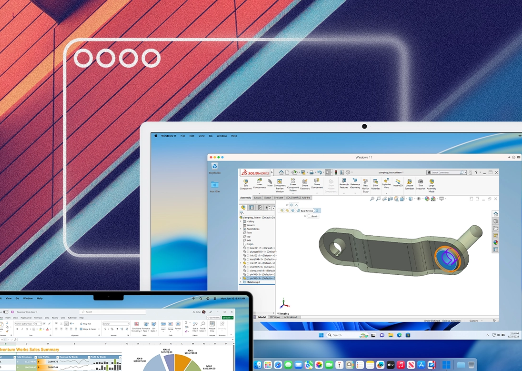
Many ways to run Windows on a Mac rely on unofficial workarounds that Microsoft hasn't formally sanctioned. Parallels Desktop is specifically the only third-party virtualization solution currently authorized by Microsoft to run Windows 11 in a virtual environment on Apple Silicon Macs.
Officially authorized by Microsoft for Apple Silicon
Parallels Desktop is specifically the only third-party virtualization solution currently authorized by Microsoft to run Windows 11 on Apple Silicon Macs — a documented official status rather than an unsanctioned workaround.
True virtualization, not emulation
Parallels Desktop runs Windows as a genuine virtual machine with dedicated CPU, memory, and storage resources, rather than emulating Windows hardware in software — a distinction that affects both performance and compatibility with Windows-only applications.
No reboot or dual-boot partition required
Windows runs alongside macOS without requiring a reboot or a separate Boot Camp partition — a specific architectural advantage over dual-boot setups that force users to fully switch operating systems to use either one.
Coherence Mode for seamless app integration
Coherence Mode specifically removes the Windows desktop and virtualization frame, allowing individual Windows applications to appear directly alongside native macOS apps — a named feature addressing the visual disconnect common in basic virtualization tools.
Automatic handling of Windows 11's TPM requirement
Parallels Desktop automatically handles the Windows 11 TPM 2.0 security requirement through its virtualization layer, including virtual Trusted Platform Module and Secure Boot support — a specific technical accommodation that removes a common installation hurdle.
Dedicated resource allocation preventing contention
The software allocates a dedicated slice of the Mac's memory and CPU specifically to the Windows virtual machine, so macOS and Windows don't compete for the same resources — a concrete resource-management approach rather than shared, uncontrolled resource access.
Tiered editions for different user needs
Parallels offers Standard, Pro, and Business editions with differing vRAM, vCPU allocations, and support levels — genuine tiered options rather than a single fixed configuration for all use cases.
At a Glance
Product: ** Parallels Desktop
Developer: ** Parallels
Platform: ** macOS (Apple Silicon and Intel)
Key status: ** Microsoft-authorized for Windows 11 on Apple Silicon
Editions: ** Standard, Pro, Business
Who It Suits
This software suits Mac users who need to run Windows-only applications without buying a separate PC or committing to a dual-boot partition. Its Microsoft authorization and automatic handling of Windows 11's security requirements also make it a dependable, officially supported choice rather than relying on unofficial virtualization workarounds. Buy Parallels Desktop — **
Visit store