
YAASA DE/AT · Articles
Cable Management and Setting Up a Desk
Cable Management and Setting Up a Desk
BUSINESS · GLOBAL
Cable Management and Setting Up a Desk
Why it matters, the practical solutions, power safety and a desk that works
Cable management is treated as a tidiness question and is mostly about being able to move, clean and change equipment without a half-hour of untangling.
Start by counting
Every device, its power supply and its data cable. Most desks have fewer sockets than devices, which is where the tangle begins.
A single dock or hub reduces the cables reaching the laptop to one, which is the biggest single improvement on any desk.
Get cables off the floor
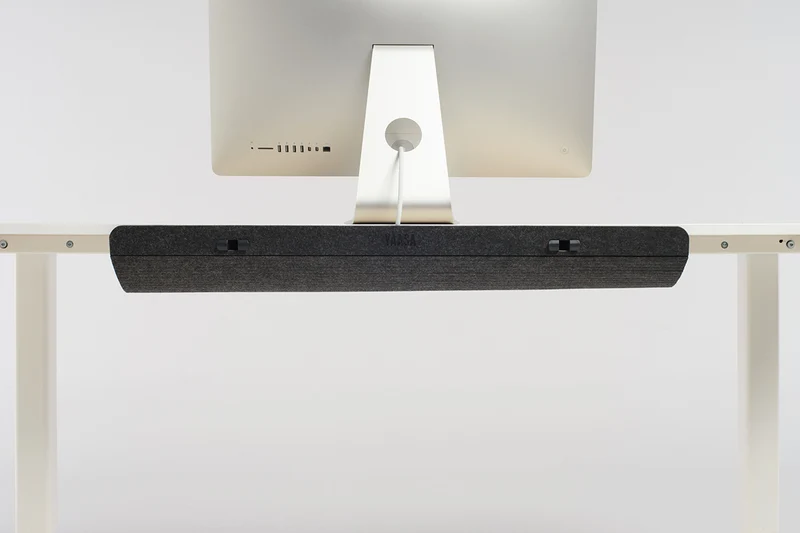
A cable tray under the desk holds the extension block and the power supplies, which keeps the floor clear for cleaning and stops feet catching. Adhesive clips route cables along a leg.
Sleeves and spiral wrap bundle a run neatly, and make changing one cable harder — use them where the setup is settled.
Sit-stand desks need slack
Route cables with enough length for the full travel, secured so nothing is dragged or pinched as the desk rises. A cable caught at the top of the travel damages equipment and the desk.
Test the full range of movement before fixing anything permanently.
Power safety
Add up the wattage on any extension, which is limited to around 3000 watts in total whatever the number of sockets. Never daisy-chain extensions, and unwind a cable reel fully before drawing load.
Check for warm plugs and damaged cables, and keep drinks away from power.
The rest of the desk
Screen at eye level an arm's length away, elbows at about ninety degrees, feet flat. Getting up every half hour matters more than any equipment.
Working from home
A dedicated space you can leave at the end of the day matters for how well you stop working. A desk in a bedroom makes both sleep and work worse for many people.
Employers in many countries have obligations to assess home workstations and frequently provide equipment, and most people never ask.
Lighting
Position the screen away from a window rather than facing or backing onto it, and add a task lamp. Screen brightness roughly matched to the room is less tiring over a day.
Chairs and posture
Elbows at roughly ninety degrees, feet flat on the floor or a footrest, and lumbar support in the small of the back. No chair fixes eight hours in one position, so change posture and stand up regularly.
A monitor arm keeps the screen at the right height through both sitting and standing.
Label each power supply, which saves a great deal of time when something changes.
Labelling
A tag on each power supply saves a great deal of time later.
WHERE TO BUY
Ready to shop YAASA? Use the link below to visit the official store.
→ Shop YAASA — official site
Visit this site
Visit store