
other · Articles
Replacing a Laptop Battery
Replacing a Laptop Battery
 Transact Shopping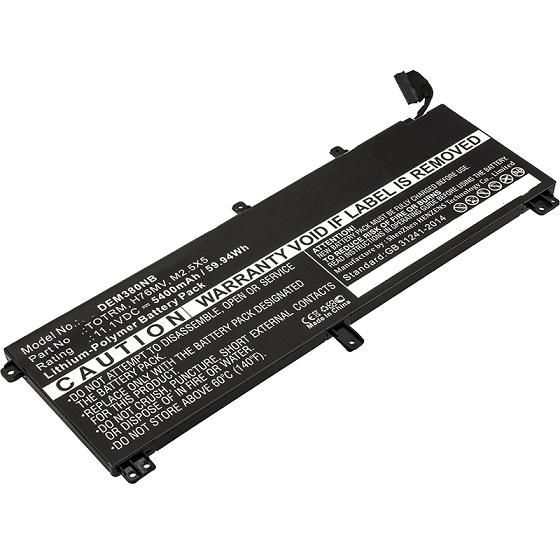
TECH · UNITED KINGDOM
Replacing a Laptop Battery
When a battery is finished, buying a safe replacement, fitting it and disposal
A new battery gives an otherwise working laptop several more years, and it is the one component where buying the cheapest available is genuinely dangerous.
When a battery is finished
Check the reported health or design capacity against the current full charge capacity — the operating system or a free utility will show it. Below about eighty percent, runtime becomes noticeably short.
Swelling is different and urgent. A battery that has swollen, causing a bulging case or a trackpad that no longer clicks, must be removed from use immediately and not charged.
Buying a replacement
Match the manufacturer's part number rather than the laptop model, since the same model frequently takes several battery types. Check the voltage and the connector.
Buy from an established supplier with protection circuitry and safety certification stated. Counterfeit and unbranded lithium packs are a genuine fire risk and are widespread on marketplaces.
A capacity figure far above the original is a warning sign rather than a bonus.
Fitting it
Shut down fully, disconnect the mains, and discharge static by touching something earthed. Internal batteries need the base removing and frequently a connector unclipping rather than pulled.
If the old battery is swollen, do not puncture, bend or force it. Handle it carefully and take it straight to a recycling point.
Making a new one last
Heat is what degrades lithium cells fastest, so keep vents clear and avoid soft surfaces. Where the manufacturer offers a charge limit, keeping it below full for desk use extends life.
Other upgrades
More memory and a solid state drive frequently give an older laptop another few years for very little, where the machine allows it. Check whether components are soldered before buying anything.
A clean reinstall of the operating system does more than people expect.
Keeping a laptop longer
Manufacturing dominates a laptop's lifetime footprint, so an extra two or three years matters far more than recycling does. Check how many years of security updates remain, since that determines how long it is safe to use.
Clean the vents periodically and avoid soft surfaces, which block airflow and cook the components.
Spares and repairs generally
Screens, keyboards, fans and drives are all replaceable on many laptops, and guides and parts are widely available. Check the repairability of a machine before buying it rather than afterwards.
Right to repair rules in the EU and UK now require spare part availability for several categories.
Disposal
Never in household waste, where damaged lithium cells start fires in collection vehicles. Take them to a battery or electrical recycling point.
Tape the terminals before transporting any loose cell.
WHERE TO BUY
Ready to shop PCHUB? Use the link below to visit the official store.
→ Shop PCHUB — official site
Visit this site