
tech · Articles
Getting Started With Video Editing
Getting Started With Video Editing
 Transact Shopping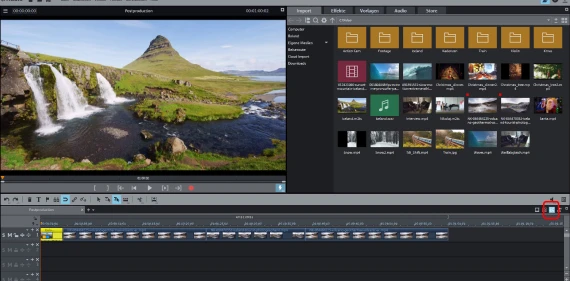
SOFTWARE · UNITED KINGDOM
Getting Started With Video Editing
Project setup, the editing workflow, exporting and what slows you down
Video editing software looks complicated and rests on a small number of concepts. Getting those right at the start prevents most of the problems people run into hours later.
Set the project to match the footage
Resolution and frame rate should match what you filmed. Mismatched frame rates cause stuttering that no amount of adjustment afterwards will fix properly.
Check your camera or phone settings before filming rather than discovering a mix of frame rates in one timeline.
Organise before you edit
Copy everything off the card into a dated project folder, back it up, and only then import. Editing directly from a memory card is how footage is lost.
Label clips as you import. Finding a specific shot among two hundred files named by the camera is what makes editing miserable.
The workflow
Rough cut first — get the structure and order right with no transitions or effects. Then trim tightly. Then add sound. Then colour. Then titles.
People do this in reverse and spend an hour colour grading a shot they later cut.
Sound matters more than picture
Viewers tolerate imperfect video and stop watching bad audio within seconds. Record sound properly at the time, since it cannot be fixed afterwards in any meaningful way.
Keep dialogue levels consistent and music well below speech.
Proxies and performance
If playback stutters, generate proxy files — low-resolution copies the software edits smoothly and swaps back at export. That solves most performance complaints without new hardware.
Exporting
H.264 or H.265 at a sensible bitrate covers almost every use. Match the resolution and frame rate of the project rather than upscaling.
Hardware that actually helps
Fast storage and plenty of memory do more for editing than a faster processor alone. An SSD for the project files is the single most effective upgrade.
A second monitor helps enormously, since the timeline and the preview window otherwise compete for the same space.
Learning it
Finish one short project end to end before exploring features. Completing something teaches the workflow; watching tutorials without editing teaches very little.
Backing up a project
Keep three copies of footage, on two types of media, with one off-site. Losing a project part way through is the most common disaster in editing and it is entirely preventable.
Save incremental versions of the project file rather than overwriting one, so a corrupted file does not cost the whole edit.
Free alternatives
Capable free editors exist and are enough for most people. Try one before paying for anything.
Music and footage rights
You need a licence for any music or stock footage you use, including on personal channels. Platforms detect copyrighted audio automatically.
WHERE TO BUY
Ready to shop MAGIX? Use the link below to visit the official store.
→ Shop MAGIX — official site
Visit this site